
When we are going to change the hardware model for any device we need use the parameter called "new_hardware" which takes the hardware name as a value.
We can accomplish this by two ways:
1- API call
Let say we have a device (Blade-server1) with a hardware model assigned:
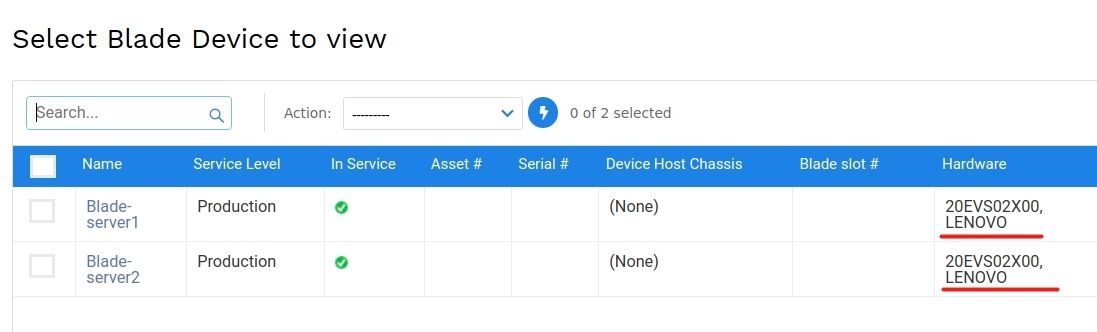
to change its hardware model we can use the following API call:
curl -X POST -d "name=blade-server1&new_hardware=DD2" -u 'u:p' https://D42_IP/api/device/ --insecure

{
 "msg": [
 "device added or updated",
 115,
 "Blade-server1",
 true,
 false
 ],
 "code": 0
}
Where "DD2" is the new hardware model name, and here is the result:

2- Excel bulk Import
From the devices page we can select more than one device, then from the drop-down action menu do re-import:
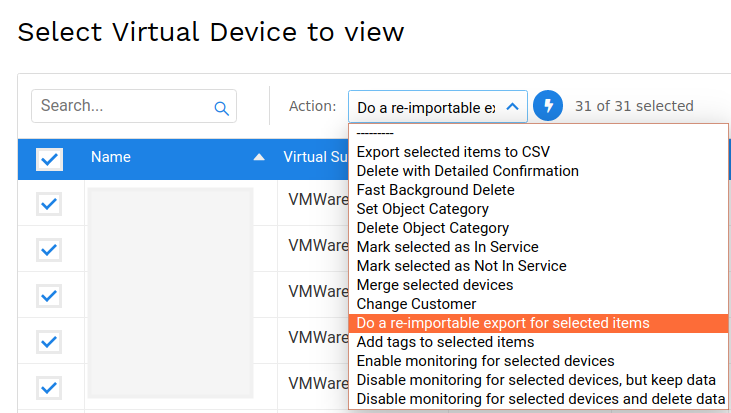
Create a new column called "new_hardware" and insert the new hardware model name under this column:
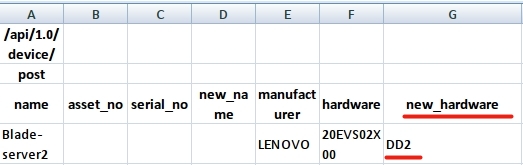
Then save and upload/import this file under: Tools > Imports/Exports (xls)

The most important note for both cases that the hardware model must be exist on the system.


