
In order to delete ports or IP addresses from any device using API call we need to use their corresponding IDs on Device42. We can use either API call to get these IDs or DOQL queries.
Getting ports IDs
DOQL
select d.name,n.netport_pk
from view_device_v1 as d
left join view_netport_v1 as n on d.device_pk=n.device_fk
where d.name='device_name'
API
curl -X GET -u 'u:p' 'https://your-device42-ip/api/1.0/switchports/?switch_id=115' --insecure
where switch_id can be any device ID.
Getting IP addresses IDs
DOQL
select d.name,i.ipaddress_pk
from view_device_v1 as d
left join view_ipaddress_v1 as i on d.device_pk=i.device_fk
where d.name='device_name'
API
curl -X GET -u 'u:p' 'https://your-device42-ip/api/1.0/ips/?device=name' --insecure
Delete port
curl -X DELETE -d "id=ID" -u 'u:p' https://your-device42-ip/api/1.0/switchports/<ID>/ --insecureDelete IP address
curl -X DELETE -d "id=ID" -u 'admin:adm!nd42' https://your-device42-ip/api/1.0/ips/<ID>/ --insecureTo execute the DOQL queries you can use the following URL:
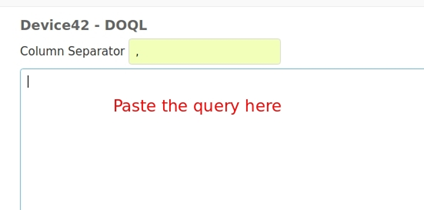
https://your-device42-ip/admin/rackraj/tools/d42viewer/doql/
Replacing the your-device42-ip with your appliance IP or DNS
And use “,” as column separator
Or using the command line:
curl -s -k -X POST -d "query=select d.name,n.netport_pk from view_device_v1 as d left join view_netport_v1 as n on d.device_pk=n.device_fk where d.name='name'" -u 'u:p' 'https://your-device42-ip/services/data/v1.0/query/'
